Now with hawdware support for multiple weather station vendors
Version 5.3.6.1 is now the current stable release.
Version 5.6.0.0 is the current beta release.
Click on the link above for the latest on new releases and other developments.
See here for some frequently asked questions. This page will be updated periodically to include common questions about WSDL.
Click here to find out more about this capability that was released in version 4.2 of WSDL. The remaining stock of version 2 shields is now available at a discounted price!
This free weather data logging application is focused on the following objectives:
This Windows application will display and log weather data obtained through a USB connection to the Oregon Scientific WMR88, WMR100, WMR200 and RMS300 weather stations. It also supports the WxShield reciever for Oregon Scientific wireless sensors. You will find features here for a wide range of users, from novices, to experts. The extensive user manual describes program features in detail and includes informative discussions on many topics.
The display includes most of the data available on the console, analysis of wind and temperature data plus graphs of temperature, pressure, wind and rain over varying periods of time. Data is also logged to a CSV file with options for automatic backup and trimming. Daily extremes can be extracted from the log file and written to a separate CSV file. Data upload to Weather Underground and CWOP is supported. Web pages can be generated and uploaded to web servers through FTP.
The current stable version is 4.4. WSDL is now under development again. The best method for submitting comments, bugs and feature requests is via the SourceForge OpenDiscussion for WSDL, here.
Screen Shot of Version 4.7.0
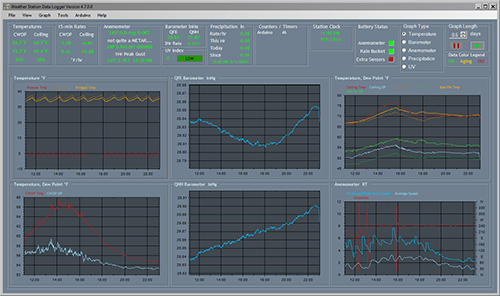
Full-size Image
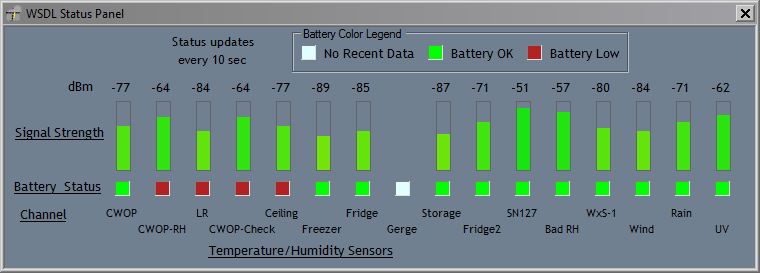
Users with the version 2 Arduino WxShield will also get this signal strength readout for their wireless sensors:
This application is designed to work with the indoor console receiving multiple outdoor temperature and humidity sensors and with or without the optional UV sensor. The following data is accepted from Oregon Scientific weather station consoles:
WSDL can now handle the maximum number of external wireless temperature/humidity sensors. Custom names can be provided for each sensor and graph colors can be user-defined. WxShield users can configure up to 20 wireless sensors.
Up to 16 graphs can be displayed at one time, and each graph can display a different type of data and/or different set of sensors. Graph setups can be saved for later recall; you can create setups for different kinds of weather -- storms, heat waves and so on.
Data processing on the raw console data yields the following additional information:
The CSV-format log file is updated once a minute with the following information:
Data can be periodically transferred to any of the following internet weather providers:
Web pages can also be created from templates and uploaded to a web server via FTP. Up to 16 PNG graphs can be created for upload, independent of the graphs displayed in the main window.
Users can generate a CSV summary file containing daily extremes of all data currently in the log file.
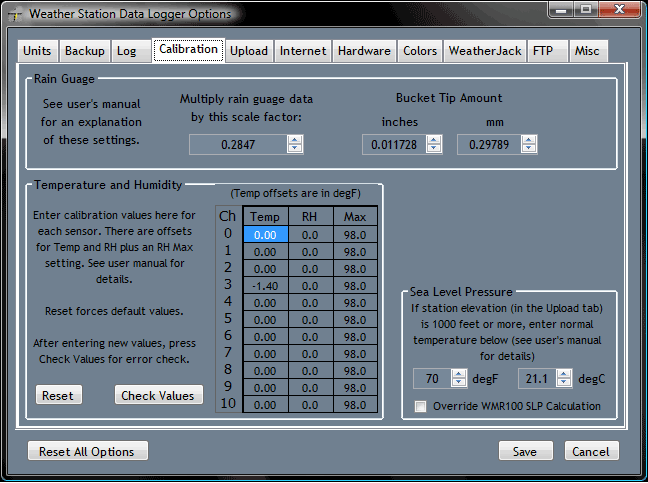
An options dialog allows the user to configure units used for display and in the CSV log file. Many aspects of automatic log file backup and trimming are also configurable.
Options Dialog
SourceForge user "jroal" has created a Google Code project for a WSDL plug-in that can operate with X10 devices. The X10 home automation system has been around a long time now and can control home appliances by sending signals through household wiring and also provides wireless capabilities. An introduction to X10 can be found here:
http://en.wikipedia.org/wiki/X10_(industry_standard)
The Google Code project for the plug-in is here:
http://code.google.com/p/wsdl-x10/
A new document is available now that describes the RF signals transmitted by OS wireless sensors. This document covers all known versions (1.0, 2.1 and 3.0) of these RF protocols. It also documents some RF protocols of Acu-Rite brand wireless sensors.
http://www.osengr.org/WxShield/Downloads/OregonScientific-RF-Protocols-II.pdf


Checksums for release files are available on the software notes page below.

